
AI assistants
A quiz from ChatGPT or Claude, the game right in BeCloser
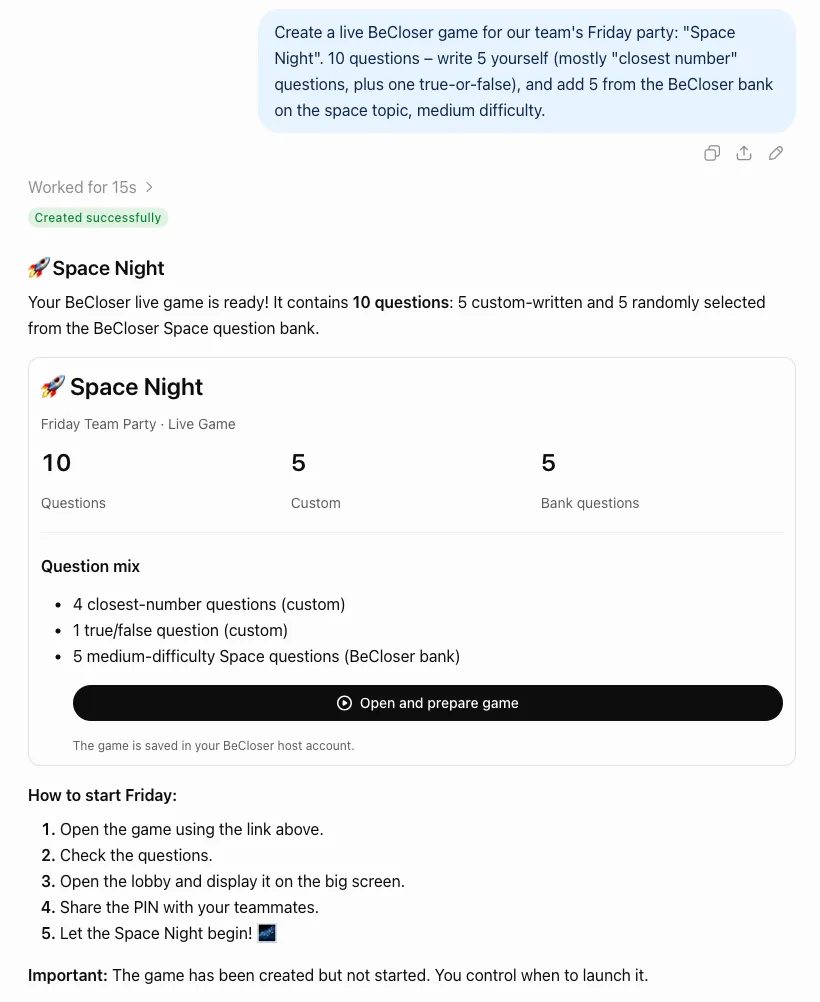
Connect BeCloser to ChatGPT, Claude or another assistant that supports MCP connectors, and just ask for a game in the chat. The assistant writes questions or takes them from the BeCloser bank and creates the game in your games; you check it and host it as usual.
- A live game or a quiz by link with a deadline – whichever you ask for.
- The assistant’s own questions, random ones from the bank by topic and difficulty, or both.
- Nothing to copy: the game is already in “My games”, ready to check and start.
From nothing to a game in four steps
Connect once, then just write in the chat.
Connecting takes about 2 minutes, once
- 1
5 seconds
Copy the address
One address for any assistant.
https://becloser-game.party/mcp - 2
1 minute
Add a connector
In the assistant’s settings, add a custom connector with this address.
Claude
- 1Settings → Connectors
- 2“Add custom connector”
- 3Name: BeCloser, URL: the one above → “Add”
- 3
30 seconds
Sign in and allow
The assistant opens BeCloser: sign in and press “Allow”. Only once.
BeCloser
claude.ai asks for access to your BeCloser account
Allow - 4
every time
Ask for a game
Say in the chat what game you want. The draft appears in “My games”.
Create a 10-question space quiz for our team party
Done! The game is in “My games”.
Space NightLive game · 10 questions
Play!
Open the game from the assistant’s link, check the questions and show the PIN on the screen.
What to ask for
Write as you would to a person: who the game is for, how many questions, what about and which kind.
- Office party
“Create a 15-question live game for a tech company’s holiday party: technology, film and music, a few number questions.”
- A lesson
“Make a 10-question geography quiz for year 7 about rivers and mountains: multiple choice and true or false.”
- Party with friends
“A birthday game: 8 questions about 2000s music and one poll, “Which song is the best?”.”
- More questions
“Add 5 more questions to this game, a bit harder.”
- A quiz by link
“Create a 10-question football quiz by link, open it and give me the link for players.”
- From the question bank
“Add 10 questions from the BeCloser bank on “Space”, medium difficulty.”
What the assistant can and can’t do
The assistant can
- see your games
- create games: live or a quiz by link
- write questions: closest answer, multiple choice (one or several right), true or false, poll
- take random questions from the bank by topic and difficulty
- add questions to a game that hasn’t been played
- open a quiz by link and give you the players’ link
The assistant can’t
- delete games
- start a live game: you start it from the game page
- see players or their answers
- change account settings
Safety and data
- You give access on BeCloser’s own page. It shows where you’ll be returned to, and what the assistant can and can’t do.
- Disconnect an assistant any time on the “AI assistants” page in the admin. Games it already created stay.
- “Sign out everywhere” disconnects every assistant too.
- The assistant’s company gets only what you ask it for: the list of your games and what it creates or adds. From there it handles that data under its own terms.
Without signing in
One more address – read-only, no sign-in and no account. With it, any assistant can tell people about BeCloser and show the bank’s topics and sample questions with answers.
https://becloser-game.party/mcp/public It can’t create games.
Common questions
Is it free?
Yes. Everything in BeCloser today is free: games, questions and players with no limits. No bank card needed. Whether your assistant’s plan has connectors, see its help.
Which assistants work?
ChatGPT, Claude and other assistants that support MCP connectors.
Do I need a BeCloser account?
Yes, for the assistant to create games: they appear in your account. Players don’t need an account, as always.
What is MCP?
The Model Context Protocol – an open way to connect other services to AI assistants. BeCloser gives the assistant a few actions: see your games, create a game, add questions, open a quiz by link.
Can the assistant start the game?
No. It gives you a link to the game page, and you start a live game yourself. A quiz by link it can open and give you the players’ link.
How do I disconnect an assistant?
“Disconnect” on the “AI assistants” page in the admin. “Sign out everywhere” disconnects every assistant at once. Games they already created stay.
Your first game with an assistant – in a minute
Create a BeCloser account, connect your assistant on the “AI assistants” page and ask for a game.